Crypto payments for an established Joomla shop
Many VirtueMart stores have been trading for years. They have a customer base, a product catalogue that took ages to build, and a Joomla site that has been carefully moved from version to version. What they rarely want is a payment add-on that forces a new account with a processor, a new dashboard to log into, and a percentage taken from every sale.
The Payfim plugin is a standard VirtueMart vmpayment plugin. You install it through the Joomla extension installer like any other extension, create a payment method in VirtueMart, and point it at your own self-hosted Payfim Gateway. From then on:
- Coins go straight to addresses you control. Payfim never holds the funds and never asks for private keys or seed phrases.
- No transaction fees from Payfim. Your customer pays the normal network fee of the coin they choose; you receive the full invoice amount.
- No onboarding or account review. There is no third party that can decide your catalogue is too risky and switch your checkout off.
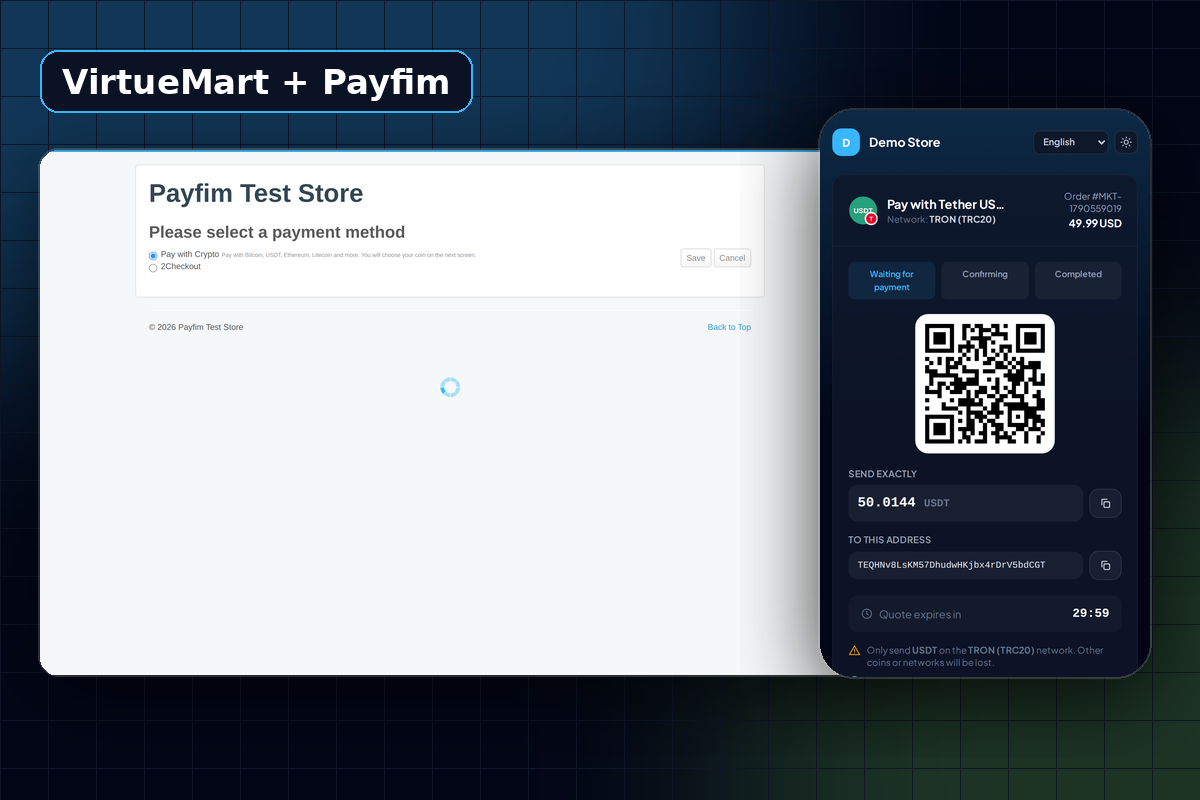
It fits alongside the payment methods you already run. PayPal, bank transfer or cash on delivery stay exactly as they are; crypto is simply one more line in the payment step.
How a crypto payment moves through VirtueMart order statuses
VirtueMart tracks orders with status codes, and the plugin works with them rather than around them. By default it uses three that every VirtueMart installation already has:
| Moment | Default status | What is recorded |
|---|---|---|
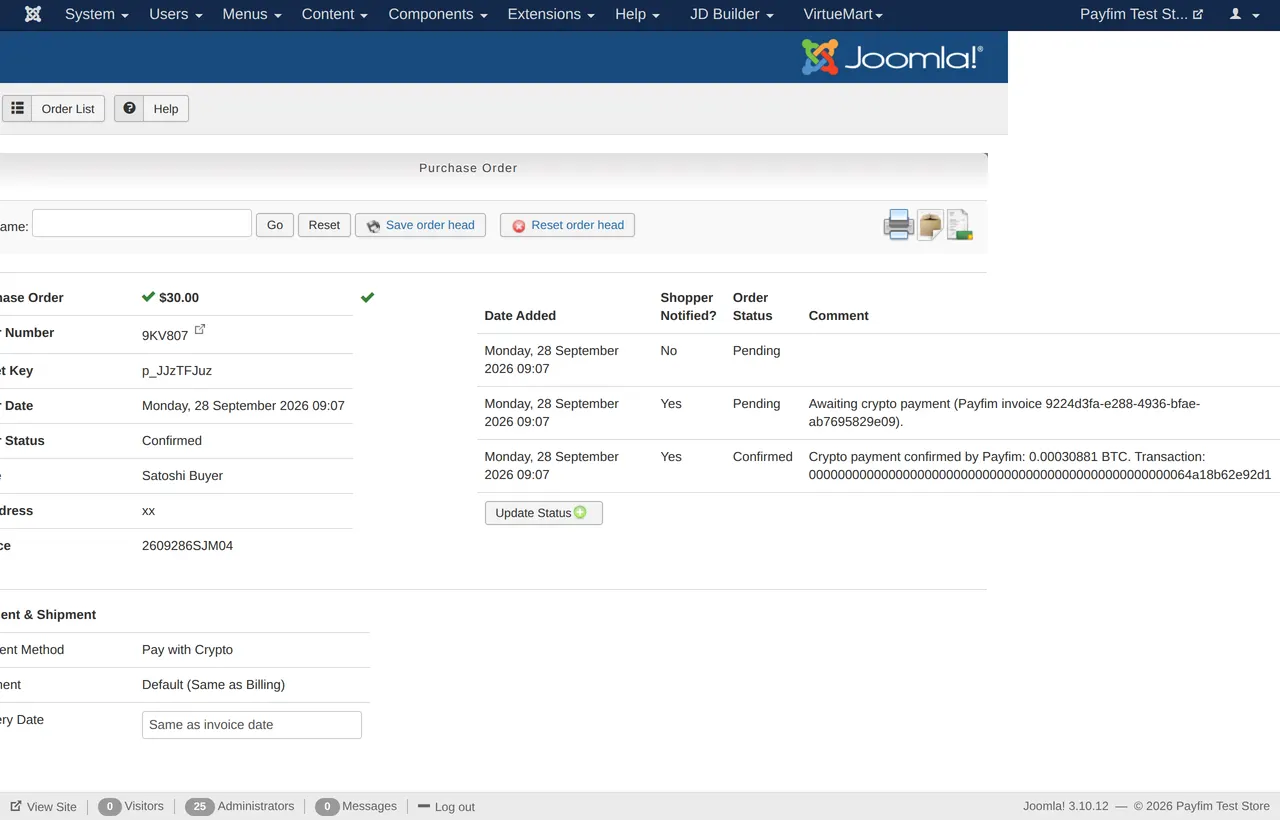
| Customer clicks Confirm Purchase | Pending (P) | History note with the Payfim invoice ID |
| Payment reaches your confirmations | Confirmed (C) | Coin, amount received and transaction hash; customer notified |
| Quote expires unpaid | Cancelled (X) | History note; only applied while the order is still awaiting payment |
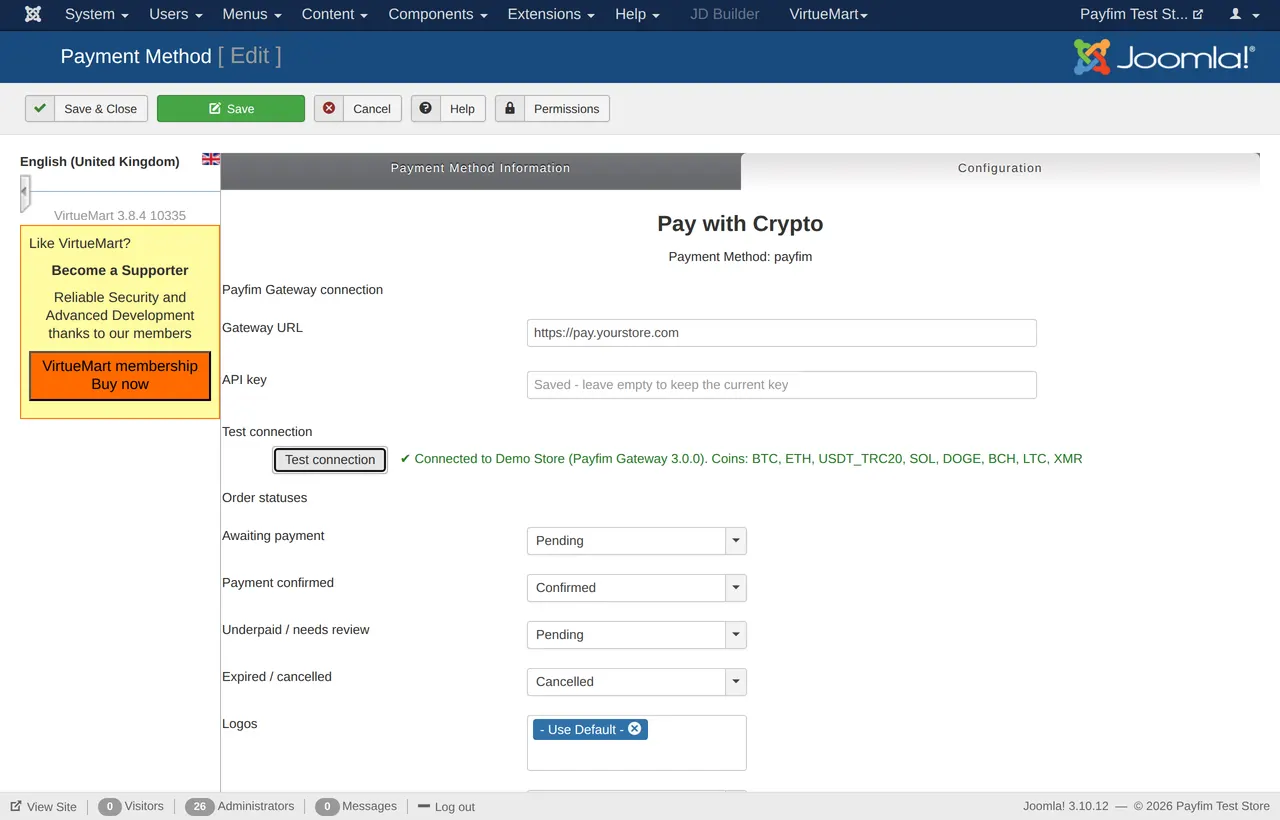
You can change each mapping in the plugin settings. If you have built custom statuses under Configuration → Order Statuses - for example a separate status for orders that need a manual look - the plugin can use those too.
The invoice is created on the server from the stored order total, converted with VirtueMart's own currency handling into the payment currency of the method. The customer never sees an editable amount, and the returned invoice must match the order before the customer is redirected. When the customer comes back from the gateway, VirtueMart shows its normal thank-you page, but the order is only confirmed by the signed webhook from your gateway - never by the redirect alone.
Underpayments without a native "on hold" status
Crypto customers sometimes send slightly less than the invoice, usually because an exchange deducted its withdrawal fee from the amount. Beyond a small tolerance (0.5% by default in the gateway), Payfim flags the invoice as underpaid and the plugin never confirms the order.
VirtueMart does not ship with an "on hold" status, so by default an underpaid order stays Pending and gets a history note such as Only 0.00012 of 0.00015 BTC received. If you want these orders to stand out in the order list, create your own status in Configuration → Order Statuses and select it as Underpaid / needs review in the plugin. You then decide whether to ask the customer for the difference or refund from your wallet. Our guide on handling crypto underpayments and refunds covers both options.
What protects your orders
Every notification from the gateway is signed with HMAC-SHA256 and must be less than five minutes old. A valid signature is still not enough: the plugin fetches the invoice from your gateway again and checks that the invoice ID, order number, payment method and amount all match what VirtueMart stored for that order. A forged or replayed "paid" message changes nothing.
Status changes are recorded atomically, so if the same webhook arrives twice - gateways retry on slow connections - the order is confirmed once and the customer gets one e-mail. If a customer retries checkout after the cart total changed, the gateway cancels the old open invoice and issues a new one, so a stale amount cannot be paid.
The API key is stored encrypted using VirtueMart's own crypted-field mechanism and is never printed back into the admin page. Errors are written to administrator/logs/payfim-virtuemart.php without the key. More on the overall design is on our security page.
If an order stays Pending after payment
Almost every "paid but still Pending" case has the same cause: the gateway could not reach your store. The notification URL has the form index.php?option=com_virtuemart&view=vmplg&task=notify&tmpl=component&pm=... and must be reachable from the gateway server. Joomla's offline mode, an IP block in a security extension or a firewall rule are the usual culprits. Open the invoice in the gateway admin to see the webhook log with the HTTP status your site returned.
A 401 in that log means the API key saved in VirtueMart differs from the gateway's key, or one of the two servers has a clock that is more than five minutes off. Re-enter the key and make sure time sync (NTP) is on.
Requirements
| VirtueMart | 3.8 - 4.x (tested end to end on VirtueMart 3.8) |
|---|---|
| Joomla | 3.10, 4 or 5 (installation verified on Joomla 5) |
| PHP | 7.4 - 8.4 |
| Extension type | VirtueMart payment plugin (vmpayment), no core edits |
| Gateway | Payfim Gateway 3.0+ on HTTPS (included in your download) |
| Hosting | MySQL/MariaDB and cURL; normal cPanel shared hosting works |
The plugin only uses Joomla's Joomla\CMS classes and has no Composer dependencies, which is why the same package installs on Joomla 3.10 and Joomla 5. If you run HikaShop instead of VirtueMart, use the HikaShop crypto payment plugin.
Which coins should a VirtueMart shop offer?
You can enable any of the 16 coin options on the supported coins list. For a European or international Joomla shop, a practical starting set is USDT on TRON for customers who think in dollars, Bitcoin because people ask for it by name, and Litecoin for low fees. Ethereum-based tokens need a free Etherscan API key in the gateway; Monero needs a private view key or your wallet RPC, never the spend key.
If you want to nudge customers toward crypto, set a negative price adjustment in the gateway, such as -5%. The checkout itself is available in English, Spanish, French, German, Portuguese and Turkish.
How to install the VirtueMart crypto payment plugin
- Set up your gateway. Upload the
payfim-gatewayfolder to your hosting, run the installer and add a receiving address for each coin under Wallets & coins. See Install the Payfim gateway. - Install the plugin in Joomla. Open System → Install → Extensions (Joomla 3: Extensions → Manage → Install) and upload
plg_vmpayment_payfim.zipon the Upload Package File tab. There is no need to enable it by hand. - Create the payment method. In Components → VirtueMart → Shop → Payment Methods click New, name it (for example "Pay with Crypto"), set Published to Yes, pick VM Payment - Payfim Crypto Payments and click Save once so the Configuration tab appears.
- Connect and map statuses. On the Configuration tab enter your Gateway URL and the API key from the gateway's Integrations page, click Test connection, review the status mappings and save.
- Place a test order. Buy a cheap product with Pay with Crypto, pay it, and check that the order reaches Confirmed with the transaction hash in its history. The full walkthrough is in the VirtueMart setup guide.
Screenshots