

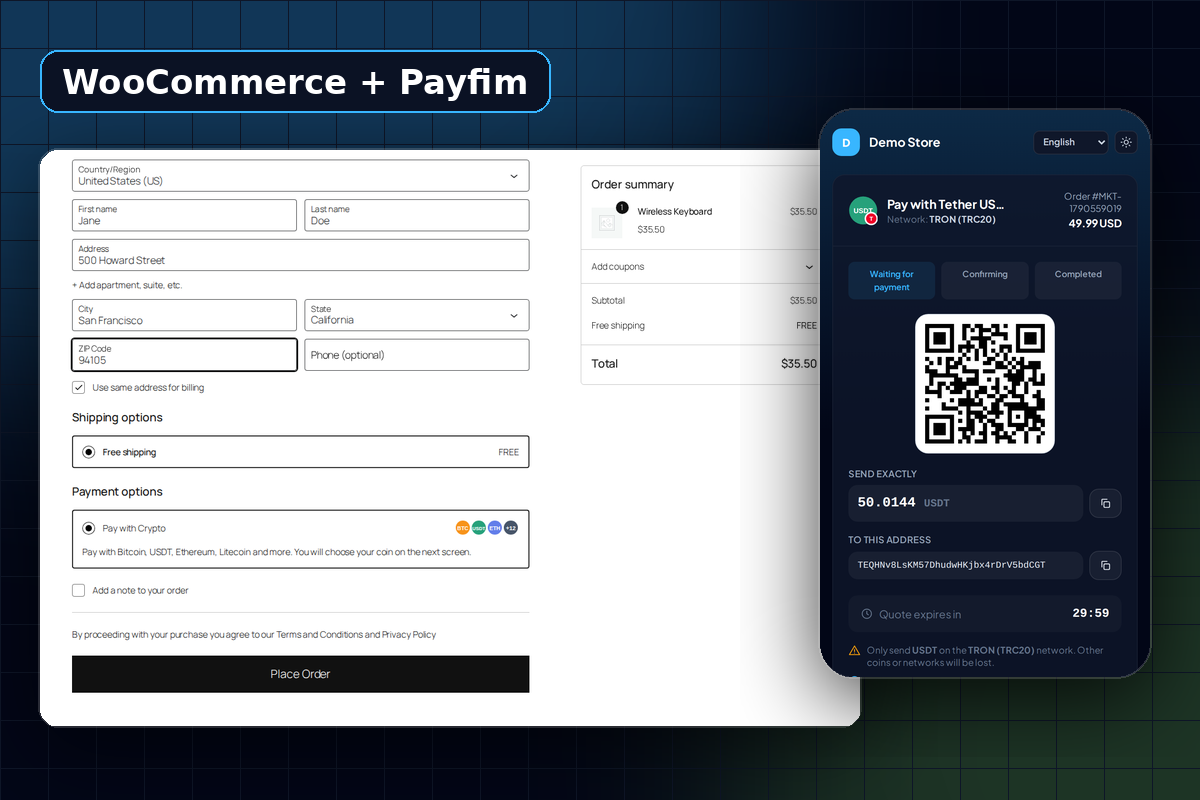
Accept cryptocurrencies on your WordPress store. Take control of your e-commerce revenue with the Payfim WooCommerce Crypto Gateway. No fees, no commission, 100% of your revenue goes straight to your crypto wallet. Designed for true financial independence, our self-hosted plugin allows you to accept Bitcoin, USDT, Monero, and 12+ other major cryptocurrencies directly on your WordPress store. Payfim sends payments directly to your crypto wallets, ensuring zero transaction fees and absolutely no KYC requirements. Our automated infrastructure continuously monitors the blockchain, and instantly updates WooCommerce order statuses the moment a transaction is confirmed. Secure your checkout, protect your profit margins, and unlock a borderless customer base today.
Why WooCommerce stores choose Payfim for crypto
Most "accept crypto in WooCommerce" plugins are thin wrappers around a hosted processor. The processor receives the coins first, takes around 1%, converts or holds them, and pays you out later - after you pass their compliance review. If they decide your products are too risky, your crypto checkout disappears overnight.
Payfim works the other way around. The Payfim gateway runs on your own hosting, the receiving addresses belong to your wallets, and the WooCommerce plugin simply asks your gateway for an invoice and listens for a signed "paid" notification. There is no middleman to approve you, no balance to withdraw and no fee on your revenue.
- Customers pay in the coin they already hold - including USDT on TRON (TRC20), the most popular way to send dollars with low fees.
- Orders move to Processing automatically once the transaction has the confirmations you chose.
- Nothing leaks to the browser: the invoice amount is created server-to-server, so a shopper cannot edit the price in their developer tools.
Built for the modern WooCommerce checkout
WooCommerce now ships the Checkout block by default. Many older gateways only work with the classic shortcode checkout and simply vanish from block-based checkouts. The Payfim plugin registers a native block payment method and supports the classic [woocommerce_checkout] shortcode, so it works whichever checkout your theme uses.
It also declares compatibility with High-Performance Order Storage (HPOS), stores its data with the WooCommerce order API instead of raw post meta, and passes the official WordPress Plugin Check tool with zero errors - the same checks used when reviewing plugins for the WordPress.org directory.
What happens when a customer pays
- The customer chooses Pay with Crypto and places the order. WooCommerce creates the order as Pending payment.
- The plugin creates a Payfim invoice for the exact order total and sends the customer to your branded crypto checkout.
- The customer picks a coin, scans the QR code and sends the payment from any wallet or exchange.
- Your gateway spots the transaction on the blockchain, waits for your required confirmations and sends a signed webhook to WooCommerce.
- The plugin verifies the signature, re-checks the invoice with your gateway, confirms the amount matches the order, and calls
payment_complete()with the transaction hash. Your usual WooCommerce emails go out.
If the customer sends too little, the order is placed On hold with a note showing exactly how much arrived, so you can decide whether to refund or ask for the difference. If the webhook is ever delayed, the thank-you page checks the invoice status itself - customers are never left wondering.
Security you can explain to your accountant
Every notification carries an X-Payfim-Signature header: an HMAC-SHA256 of the timestamp and body, signed with your private API key. The plugin rejects anything unsigned, anything older than five minutes and anything that does not match the invoice stored on the order. Even a correctly signed message is never trusted blindly - the plugin asks your gateway for the current state of the invoice before it marks an order paid.
Your wallet private keys never touch WordPress or the gateway. Payfim only needs public receiving addresses.
Requirements
| WordPress | 6.0 or newer |
|---|---|
| WooCommerce | 7.0 or newer (tested with 10.x) |
| PHP | 7.4 - 8.4 |
| Checkout | Checkout block and classic checkout |
| Order storage | HPOS and legacy post storage |
| Gateway | Payfim Gateway 3.0+ (included in your download) |
How to install the WooCommerce crypto payment plugin
- Install the Payfim gateway. Upload the
payfimfolder from your download to your hosting (for exampleyourstore.com/payfim) and open it in your browser to run the 2-minute installer. - Add your wallets. In the gateway dashboard open Wallets & coins, paste a receiving address for each coin you want to accept and switch it on.
- Install the plugin. In WordPress go to Plugins → Add New → Upload Plugin, choose
payfim-crypto-payments.zipand click Activate. - Connect. Open WooCommerce → Settings → Payments → Payfim Crypto Payments, paste your Gateway URL and API key and save. A green message confirms the connection and lists your active coins.
- Test. Place a small test order, pay it, and watch it move to Processing automatically.