Why crypto fits digital products
Digital sellers often have customers all over the world, and many of them either lack a card that works for international purchases or simply prefer to pay in crypto. For the seller, card payments bring another problem: a customer can download the file and then dispute the charge. Blockchain payments are final, so there is no chargeback process to fight. Crypto also gives buyers whose cards are refused for international purchases another way to finish the order.
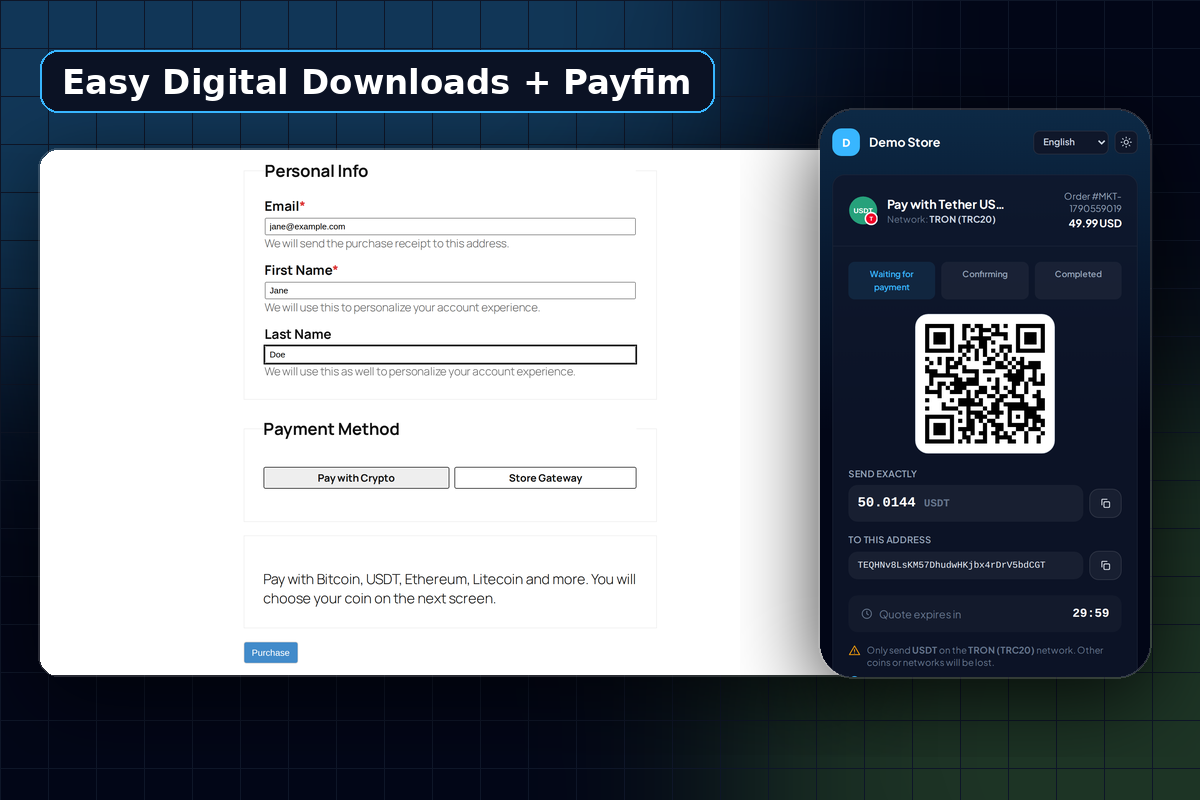
The Payfim gateway for Easy Digital Downloads adds a Pay with Crypto option that works with EDD's checkout block and the classic [download_checkout] shortcode. Customers pay on your own branded checkout page, hosted by your self-hosted Payfim Gateway, and the coins land in your wallets. Payfim takes no cut and holds no balance, which matters when margins on a $9 template are thin.
Automatic delivery, with the right safeguards
The whole point of selling downloads is that delivery happens by itself. Here is what the plugin does with each order:
| What happens | EDD order status |
|---|---|
| Customer clicks Purchase; invoice created server-side for the cart total | Pending |
| Transaction seen, waiting for confirmations | Processing, with a note |
| Payment confirmed | Completed - receipt e-mailed, downloads unlocked |
| Payment short | On Hold, with a note (or leave Pending, your choice) |
| Quote expired unpaid | Abandoned |
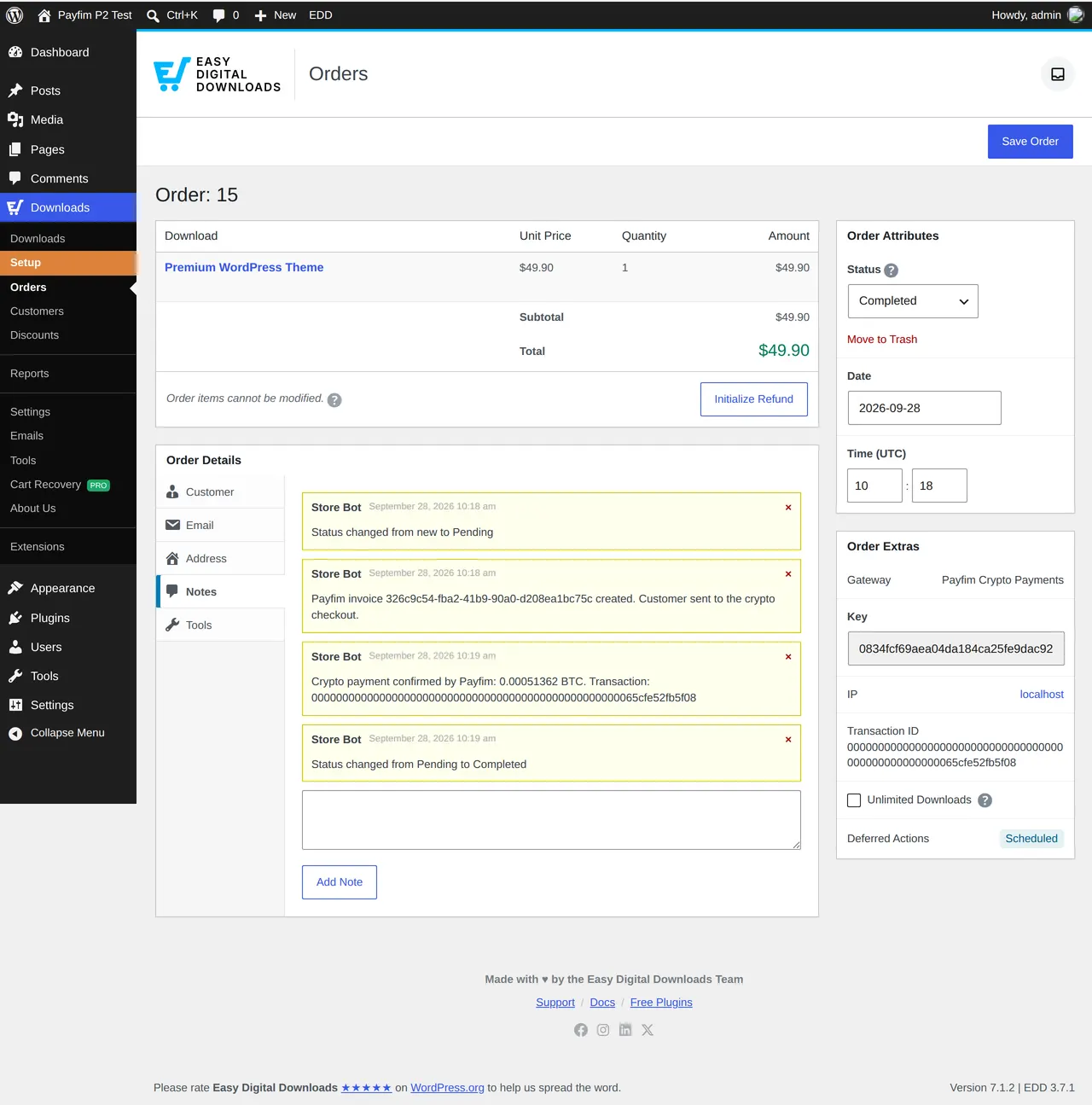
On completion, the blockchain transaction hash becomes the EDD Transaction ID, and the order notes record the invoice, coin and amount received. Orders that are already complete are never touched again, and a duplicate webhook is answered without adding a second note or a second receipt.
The status is only set to Completed after the gateway reports the payment as paid and the plugin has re-checked the invoice through the gateway API. A correctly signed but false "paid" message does not unlock a single file.
Speed vs certainty: picking coins for instant delivery
Because files unlock at confirmation, the confirmation settings in your gateway directly decide how long a buyer waits. Each coin has its own default, which you can change under Wallets & coins:
- Fast finality: USDT on TRON, TRX, Solana and XRP use their network's own finality signal rather than a block count, which usually makes them quick.
- Quick blocks: Litecoin uses 2 confirmations by default with blocks around every 2.5 minutes.
- Slower but familiar: Bitcoin defaults to 1 confirmation. It is the coin many buyers ask for by name, and a short wait is easier to accept on higher-priced products.
Fewer confirmations mean faster delivery but a little more risk on large amounts. Our explainer on blockchain confirmations helps you pick sensible numbers for your price points.
Carts that change, and payments that fall short
Digital buyers often come back to add one more item. EDD resumes the same pending order with a new total, and the plugin creates a fresh invoice for the new amount. A webhook for the old invoice is acknowledged but ignored. If a customer does manage to pay an older invoice of a resumed order, the plugin does not guess: it adds a one-time order note asking you to review it.
Underpayments - often an exchange taking its withdrawal fee from the amount sent - put the order On Hold with a note such as only 0.0009 of 0.0011 BTC received. The files stay locked until you decide. Refunds are made manually from your wallet, since crypto has no card-style refund button; see handling underpayments and refunds.
Built to WordPress standards
The plugin passes the official WordPress Plugin Check tool with no errors, escapes all output, protects the Test connection action with a nonce and EDD's manage_shop_settings capability, and uses the WordPress HTTP API with SSL verification. Return links are authenticated with a signed token, so a guessed URL cannot reveal someone else's order. Webhooks arrive on /wp-json/payfim-edd/v1/webhook, are HMAC-verified, and are processed under a per-order lock. Uninstalling removes only the plugin's own settings; orders and transaction IDs stay.
All strings use the payfim-edd text domain and a POT file is included, so you can translate the checkout label and messages with your usual translation plugin. The readme documents the external service the plugin talks to, which is your own gateway.
Pricing your downloads in crypto
You keep pricing your products in your store currency, exactly as today. When a buyer checks out, the gateway converts the order total at the current rate, taken from CoinGecko with Coinbase and Binance as fallbacks, and locks that rate for 30 minutes by default. The customer sees one exact amount and a QR code, so there is no mental arithmetic on their side.
If you want to steer buyers toward crypto, set a price adjustment in the gateway. A negative value such as -5% works as a crypto discount without creating coupon codes in EDD. You can also switch coins on and off in the gateway at any time; the WordPress side needs no change.
Many digital sellers run on shared WordPress hosting, and that is fine here. The gateway needs PHP 7.4 to 8.4, MySQL or MariaDB, cURL and HTTPS, plus a cron job every minute. It can live on a subdomain of your store, such as pay.yourstore.com, next to your existing WordPress install.
Requirements
| Easy Digital Downloads | 3.x (tested end to end on 3.7.1) |
|---|---|
| WordPress | 6.0 or newer |
| PHP | 7.4 - 8.4 |
| Checkout | EDD checkout block and [download_checkout] shortcode |
| REST API | POST requests to /wp-json/ must not be blocked by security plugins |
| Gateway | Payfim Gateway 3.0+ on HTTPS (included in your download) |
Selling physical goods too? The WooCommerce crypto plugin connects to the same gateway.
How to install the Easy Digital Downloads crypto payment gateway
- Install the gateway. Set up the Payfim Gateway on your hosting and add your receiving addresses. See Install the Payfim gateway.
- Upload the plugin. In WordPress go to Plugins → Add New Plugin → Upload Plugin, choose
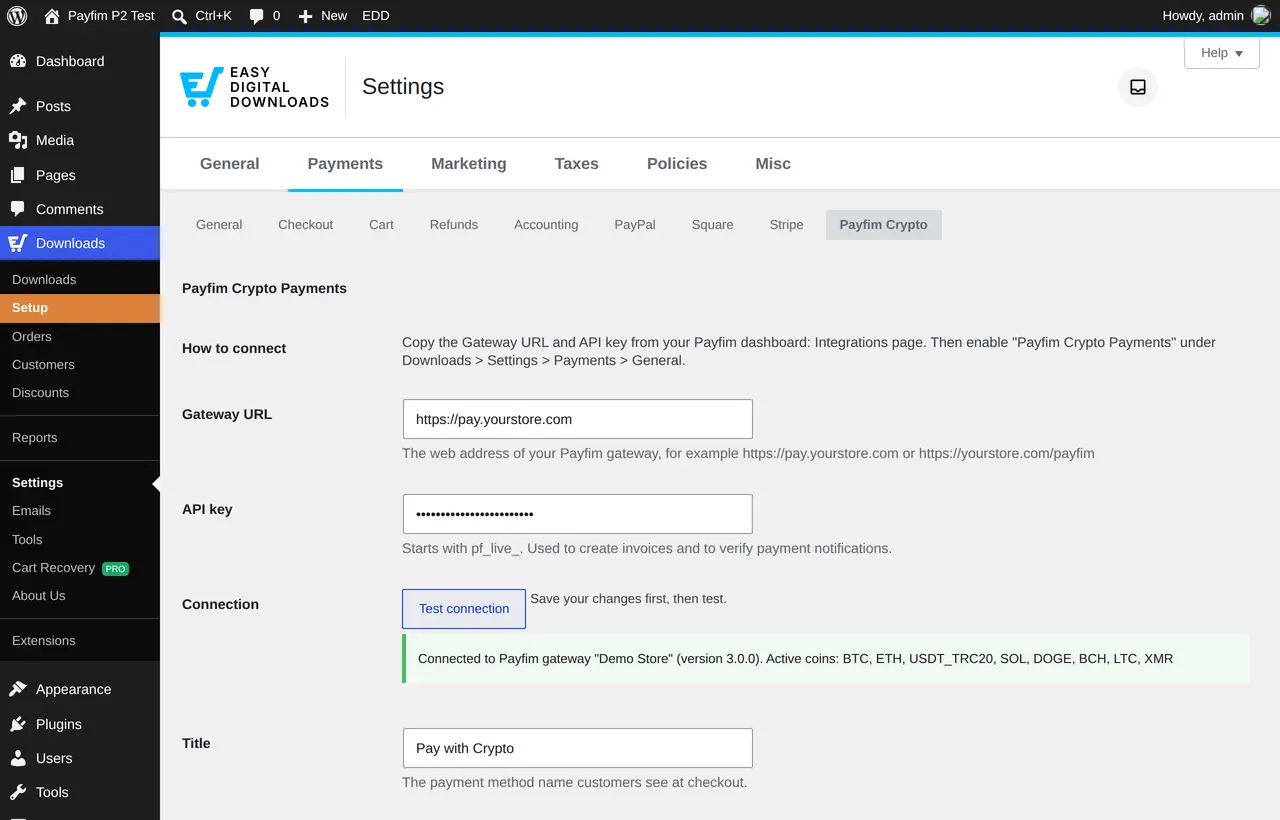
payfim-edd.zip, click Install Now and Activate Plugin. - Connect it. Open Downloads → Settings → Payments, go to the Payfim Crypto tab, enter the Gateway URL and API key, click Save Changes and then Test connection.
- Activate the gateway. On the General tab of the same screen, switch on Payfim Crypto Payments under Active Gateways (and optionally make it the default), then save.
- Buy your own product. Purchase a low-priced download with crypto and check that the order becomes Completed and the download link arrives. The EDD setup guide has screenshots of every step.
Screenshots